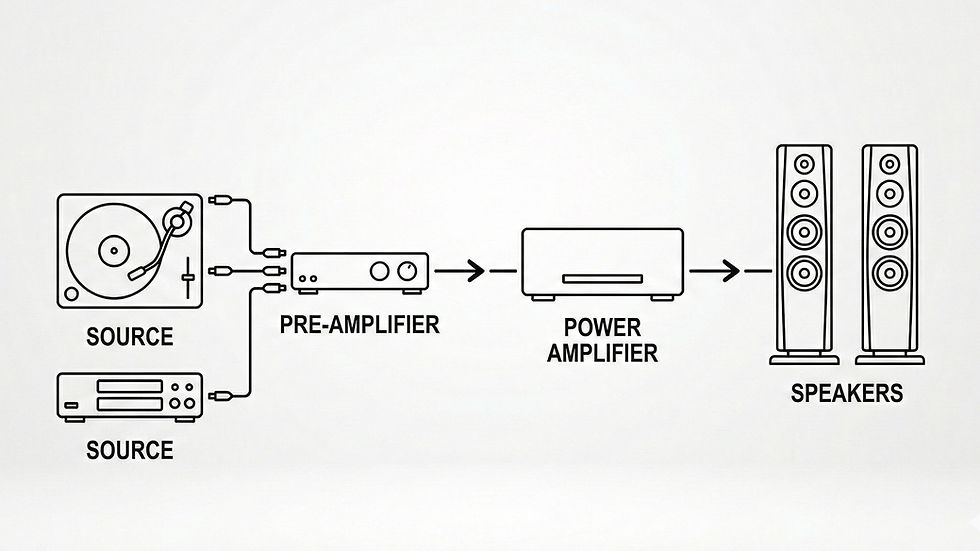
The Last Inch: Demystifying Audio Cables and Clean Power
Once you have chosen your source, matched your amplifier, and tuned your room, you are 95% of the way to audio perfection. The final 5% comes down to how electricity travels between those components.
In high-end audio, we often call this "The Last Inch." Here is how to make sure your cables and your wall outlets aren't holding your system back.
1. Electrical Noise (Dirty Power)

The music you hear from your speakers is actually just a modified version of the electricity coming out of your wall outlet.
The Problem: The electrical grid in your home is shared with refrigerators, microwaves, and Wi-Fi routers. These appliances inject "noise" into your power lines, creating a subtle background hiss or grain in your music.
The Identification: Turn your stereo on, select an empty input, turn the volume up halfway, and put your ear close to the speaker. If you hear a distinct hum, buzz, or hiss when no music is playing, you have "dirty power."
The Fix: Power Conditioning. Plug your components into a dedicated Audio Power Conditioner (brands like AudioQuest, Furman or IsoTek make great ones) instead of a cheap $10 power strip. These devices act like a water filter, scrubbing the electricity clean before it reaches your amplifier.
2. Signal Weakness (Speaker Cable Thickness)

Speaker cables carry a lot of electrical current from your amplifier to your speakers.
The Problem: If a cable is too thin or made of poor materials, it resists the flow of electricity. This acts like a kink in a garden hose, robbing your speakers of energy.
The Identification: Look at your speaker wire. If it looks like thin lamp cord or is labeled higher than 16 AWG (the higher the number, the thinner the wire), your amplifier is struggling to push power through it, especially over long distances.
The Fix: Thicker Copper (12 or 14 AWG). Upgrade to a thicker, high-purity copper speaker cable. Look for cables labeled 12 AWG or 14 AWG. This lowers the resistance, instantly giving your music more "weight" and a punchier bass response.
3. RFI and EMI (Interconnect Interference)

"Interconnects" are the smaller cables (like RCA or XLR cables) that carry the delicate signal from your Source or DAC to your Amplifier.
The Problem: Because these signals are so weak, they are highly vulnerable to picking up invisible Radio Frequency Interference (RFI) or Electromagnetic Interference (EMI) floating through the air from your Wi-Fi or phone.
The Identification: If you notice that your music sounds "blurry," or if you occasionally hear a faint pop or clicking sound when your phone is nearby, your cables are acting like antennas and catching unwanted signals.
The Fix: Shielded Cables. Replace cheap, unshielded "throwaway" cables with properly shielded interconnects. A shielded cable wraps the internal wires in a protective metal braid that blocks outside wireless signals completely, leaving you with a dead-silent, pitch-black background.
Pro-Tip: Keep it Short and Separate
No matter what cables you use, two free tricks will always improve your sound:
Keep them short: The shorter a cable is, the less chance it has to pick up noise or lose signal strength.
Separate power and signal: Try not to let your power cords run parallel to your audio interconnects. If they must cross, have them cross at a 90-degree angle to prevent the power cables from bleeding noise into your music.
Summary Checklist for "The Last Inch":
Filter the Wall: Use a power conditioner to wipe out electrical background noise.
Go Thick on Speakers: Use 12 or 14 AWG copper wire to unlock your amplifier's full bass potential.
Shield your Signals: Ensure your RCA or XLR interconnects are shielded against Wi-Fi and bluetooth signals.