The Veins of the System: A Beginner’s Guide to Audio Cables
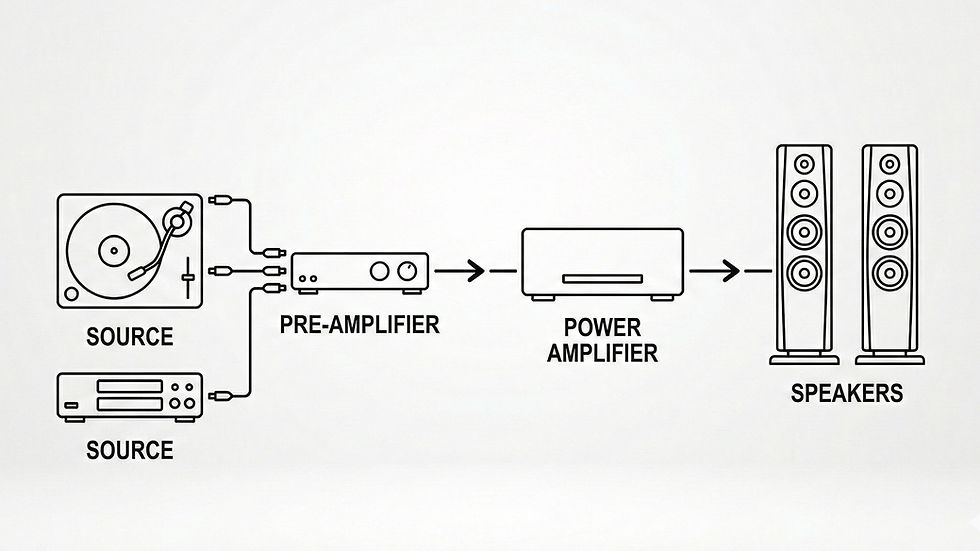
You have the source, the amplifier, and the speakers. On paper, your system is complete. But without cables, you just have expensive furniture.
In high-end audio, cables aren't just "accessories" - they are the veins of your system. They carry the electrical and digital signals from one box to another. Because these signals can be incredibly weak and delicate, the quality of your cables directly impacts how much of the original music actually makes it to your ears.
Let's break down the four main categories of cables you need to know, what they do, and how to spot them.
1. Analog Interconnects (The Delicate Signals)
These cables carry the weak "line-level" analog electrical signals between your source devices (like a CD player or turntable) and your preamplifier or amplifier.

The Challenge: Because these signals are so small, they are highly vulnerable to picking up "hum" or buzz from the Wi-Fi, power cords, and appliances in your home.
The Types:
RCA Cables: The classic "red and white" plugs. They use a single center pin for the signal and an outer ring for the ground.
XLR Cables: A thick, round connector with three pins. These are used in "balanced" high-end systems because they have a special built-in way to cancel out noise over long distances.
The Identification: Look for pair-matched (usually left and right) cables with either single-pin (RCA) or 3-pin (XLR) jacks linking your source (DAC/Turntable) to your amplifier.
2. Digital Cables (The Data Highways)
If you are streaming music, playing CDs, or connecting your TV to your stereo, you are dealing with digital data (0s and 1s). These cables transport that raw data to your DAC (translator) to be turned into sound.

The Challenge: While digital data doesn't get "noisy" the way analog does, it suffers from timing errors (called Jitter). If the "0s and 1s" don't arrive in the exact micro-second they are supposed to, the music loses its focus and realism.
The Types:
Optical (Toslink): Converts the digital signal into pulses of light and sends them down a fiber-optic cable. (Great for TV-to-stereo connections).
Coaxial: Looks like a single RCA cable but is built to carry high-frequency digital data.
USB / Ethernet: Connects your computer, network, or streamer to your DAC to pass high-resolution files.
The Identification: A single, isolated cord linking your digital player, TV, or computer to your DAC or Integrated Amplifier.
3. Speaker Cables (The Heavy Lifters)
Once your amplifier has boosted the signal, it has to push that high-power electrical current to your speakers to physically move the drivers (the cones).

The Challenge: Because of the sheer amount of electrical energy moving through these, they need to be much thicker to prevent the "energy" from getting lost on the way.
The Connection Types: They can be "bare wire," but high-end setups usually use Banana Plugs (pin-like connectors that plug straight in) or Spade Lugs (U-shaped metal forks that tighten down).
The Identification: Heavy-duty, twin-conductor cables running from the back of your power amplifier directly to your left and right speakers.
4. Power Cables (The Fuel Lines)
Your stereo system doesn't actually "make" sound -it modulates the electricity coming out of your wall outlet. If the electricity is "dirty" or restricted, the music suffers.

The Challenge: The stock power cords that come in the box are often thin, poorly shielded, and act like antennas for wireless interference.
The High-End Fix: Upgrade power cables use heavy shielding and thick, high-purity copper to block out background interference and ensure your amplifier can draw power instantly during heavy bass hits.
The Identification: The thick, heavily insulated power cord running from your wall or power conditioner to the back of your components.
Summarizing the Cabling Chain:
Digital Cables carry the code to be translated.
Analog Interconnects hand the tiny translated signal to the amp.
Speaker Cables carry the high-power energy to the drivers.
Power Cables feed the entire system with the "fuel" it needs to run.